Run your entire business from one system you actually own.
Find customers, manage sales, send quotes and invoices, reconcile payouts and handle the books — one integrated suite for the business that does real work, not the one that holds meetings about it. No separate subscription for every job, no monthly meter, and a machine you already own that works offline and is yours forever.
Zero monthly subscriptions. Buy it once or spread it over twelve or twenty-four months — then pay $0 forever.
Runs 100% offline. The ledger, the model and the document reader all live on your machine.
Double-entry books & taxes built in. Every sale posts a balanced entry; the tax center is one report away.
Windows and Linux installers; macOS runs from the source. Thirty days, the whole product, no card and no account. One workstation license is $2,200 once, $200 a month for twelve months, or $110 a month for twenty-four months — either way, the last payment is the last one.
The seam that costs a small business the most time
Put plainly: you stop typing the same customer and the same parts list twice, and once an invoice is raised the accounting entry is posted from it rather than keyed in by hand.
Almost nobody loses a day to a spreadsheet. They lose it to the seam: the job that is won on the board and has to be re-typed into the invoicing tool, the invoice that gets raised twice, the payment that arrives and does not match a line anybody remembers writing. The tool was never the problem. The problem is that the tools were built by two companies with no reason to agree with each other.
FoundrySuite removes the seam rather than papering over it. One database holds the customer, the quote, the work order, the invoice and the journal entry. An invoice and the entry it posts are one record with a link between them, not two somebody has to reconcile. A payment lands against the receivable it retires.
Nothing is synchronised because there is nothing to synchronise. See the screens, one after another →
What that means at the end of a job
- The pipeline is real. The stages you use, each deal carrying a value and a probability, weighted from the deals themselves rather than projected.
- An invoice posts through double entry. Money owed is not revenue until the work is earned; it moves when the work happens.
- The books are the authoritative record. Every posted entry balances to the cent or it is refused, and posted entries are immutable.
- Reporting is a query, not a project. The trial balance, aged receivables and the balance sheet come out of the same ledger that produced them.
How FoundrySuite Helps Throughout Your Day
The same system, from the first coffee to the last entry — because the work does not happen in one sitting, and neither does the record of it.
Morning clarity
Open the dashboard and the day is already answered: follow-ups due, open quotes waiting on a yes, overdue invoices, and the real cash position — counted from your records, not estimated.
Mid-day sales & execution
An inquiry comes in and the answer is the same hour: a quote, a work order, a sales order — each written once, in the same record, with the customer’s history already attached.
Afternoon busywork, handled
The AI researches prospects, scores leads, summarizes long threads and drafts the follow-up email — and every output sits there waiting for your approval. It never posts anything by itself.
End of day: books that close themselves
Invoice payments and marketplace payouts — Shopify, TikTok Shop, Etsy, Square — update the ledger automatically. The books are already balanced; there is nothing left to reconcile.
What it actually does
Not a list of adjectives. Here is the product.
One board, all the way down
Leads, companies, contacts, opportunities. A deal moves along the board, and the invoice you raise against it posts its own accounting entry — not a copy made by somebody else.
Every figure on the board is a sum over real deals. Weighted value multiplies each deal by its own probability, so nothing is projected by a model.
Quote, work order, invoice
A quote becomes a work order when the customer says yes; the work order becomes an invoice when the job is done. Parts and labor carry their own costs and markups, so a job's margin is a number when the customer asks.
Customer assets — the machine you service every six months — live on the customer record with their history.
Keep real books
A double-entry ledger that is the authoritative record. Invoices, bills, payments and expenses generate journal entries; the ledger is what is actually true.
Every posted entry balances to the cent or it is refused. Posted entries are immutable — a mistake is corrected with a reversing entry and a new one.
Items, stock and batches
An item catalogue with unit costs tracked over time, inventory that moves when you buy and sell, and bills of materials that turn components into finished goods — with the cost of the build worked out from what went into it.
A margin watchdog watches supplier prices and flags the quote that would now lose money.
Read the paperwork
Drop in a PDF or a scan. Text is extracted locally, then read: what kind of document it is, what it says, and the fields printed on it — ready to file against an invoice, a bill or an expense.
No cloud OCR, no upload, no third party reading your documents. Every field the model suggests waits for a person to read it first.
Work with other people
Multi-user, with the workspace enforced in code rather than by convention. Further accounts on a machine need an invitation code, so the person who finds an open laptop is not a data incident waiting to happen.
When it is reachable from a network, HTTPS is mandatory and the app refuses to start without it.
The product, running
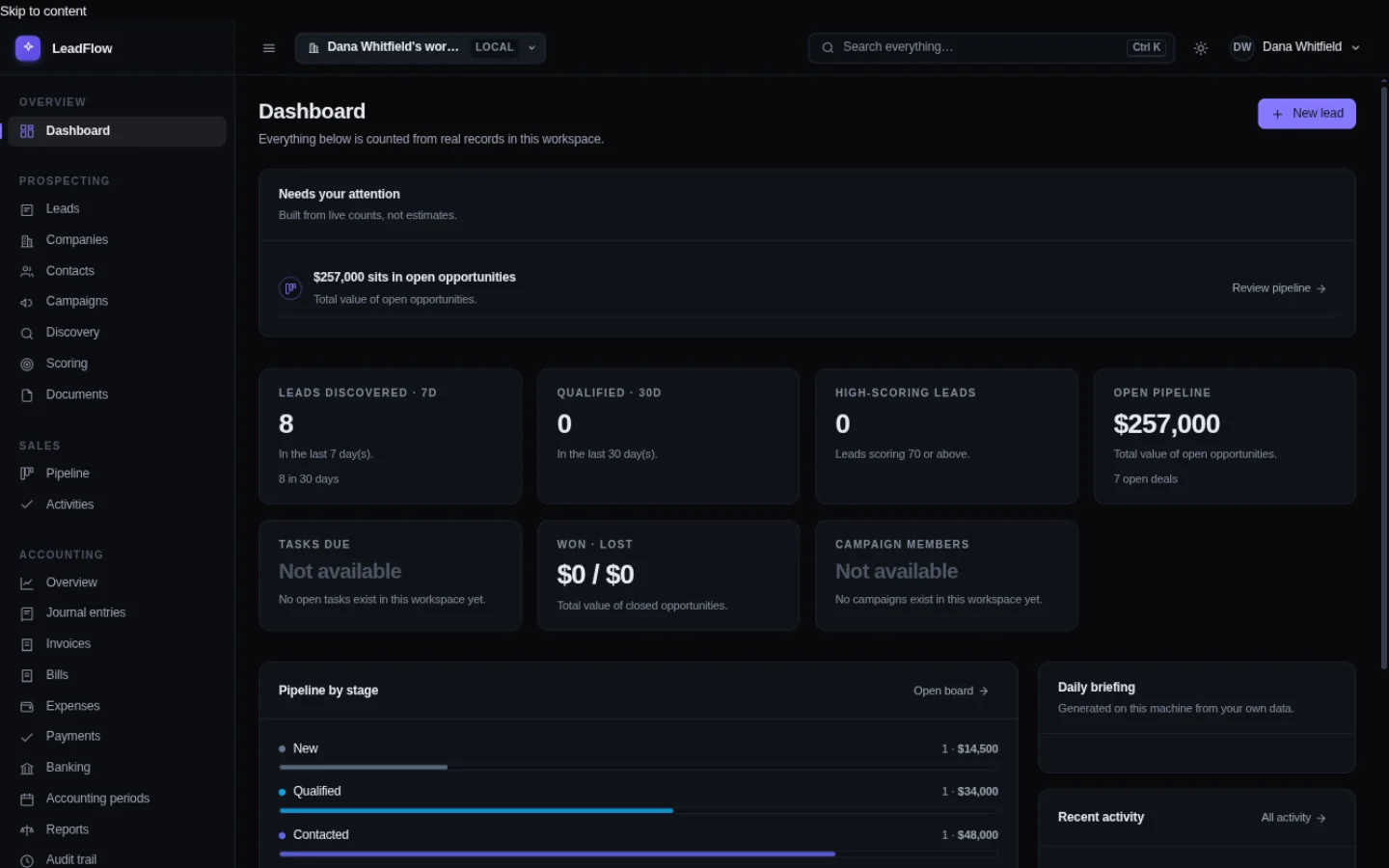
Every image below is a screenshot of this software on a real machine. Nothing here is a rendering, a mock-up or a staged demo. There is a full walk through, screen by screen, on the tour page →
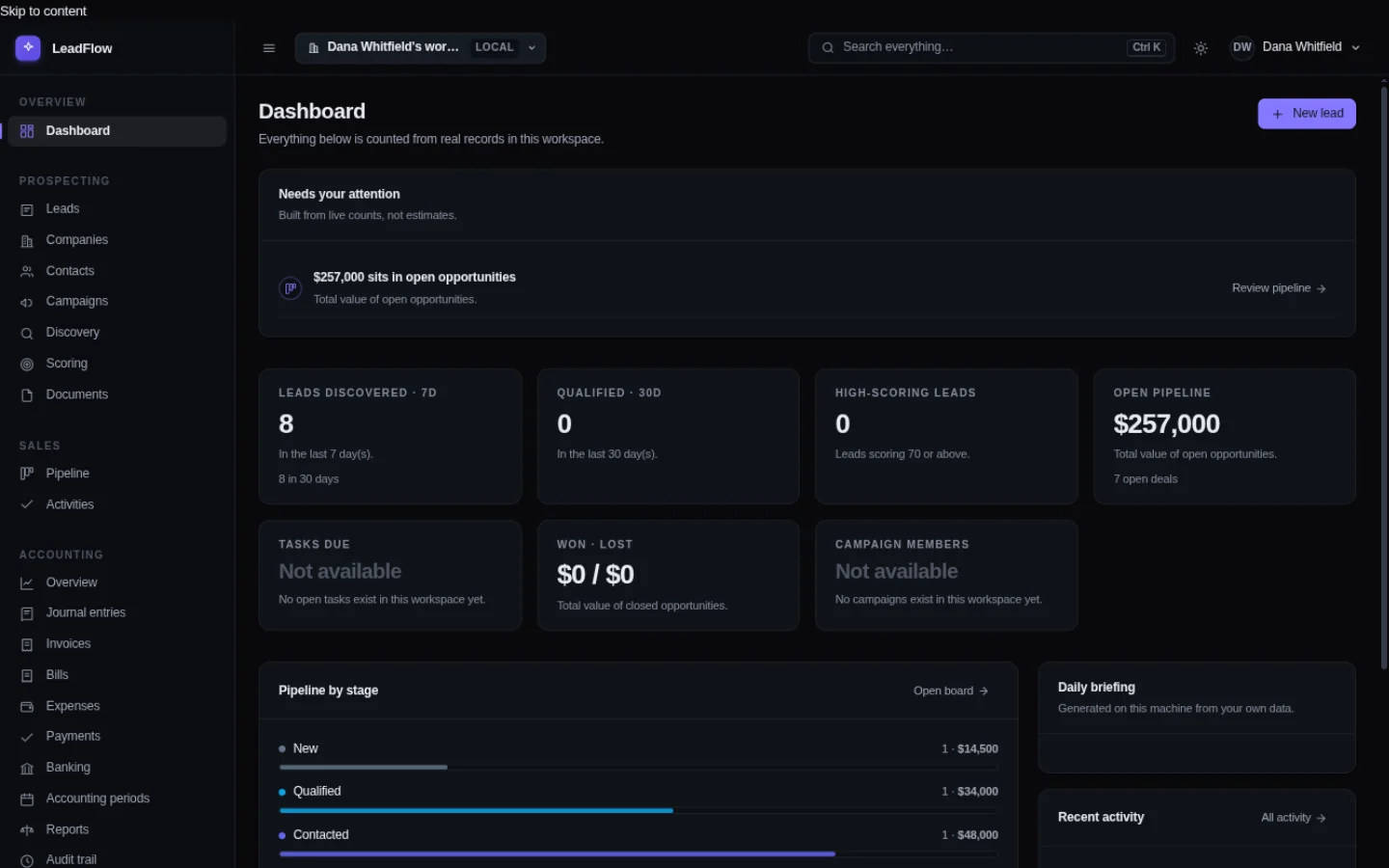
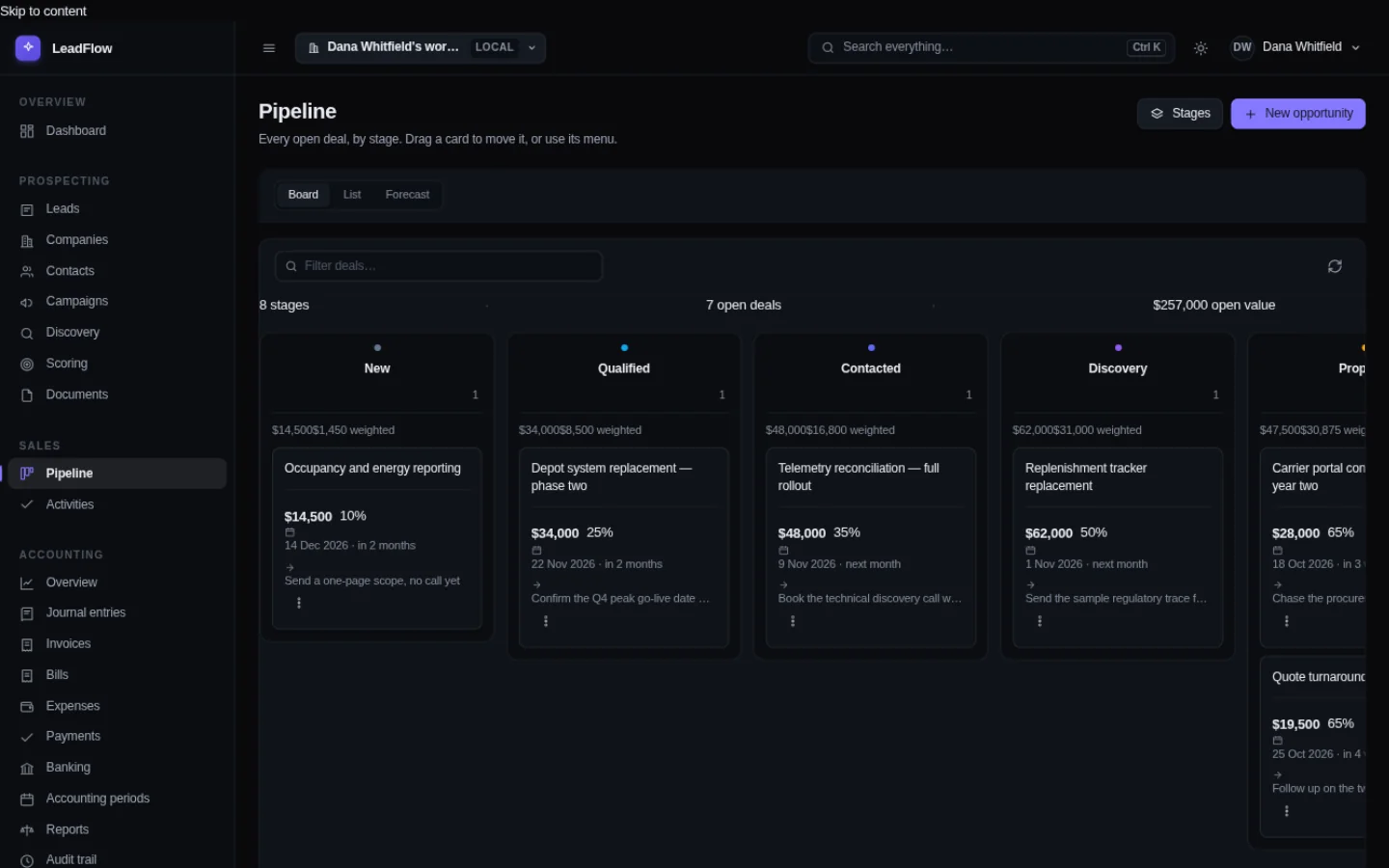
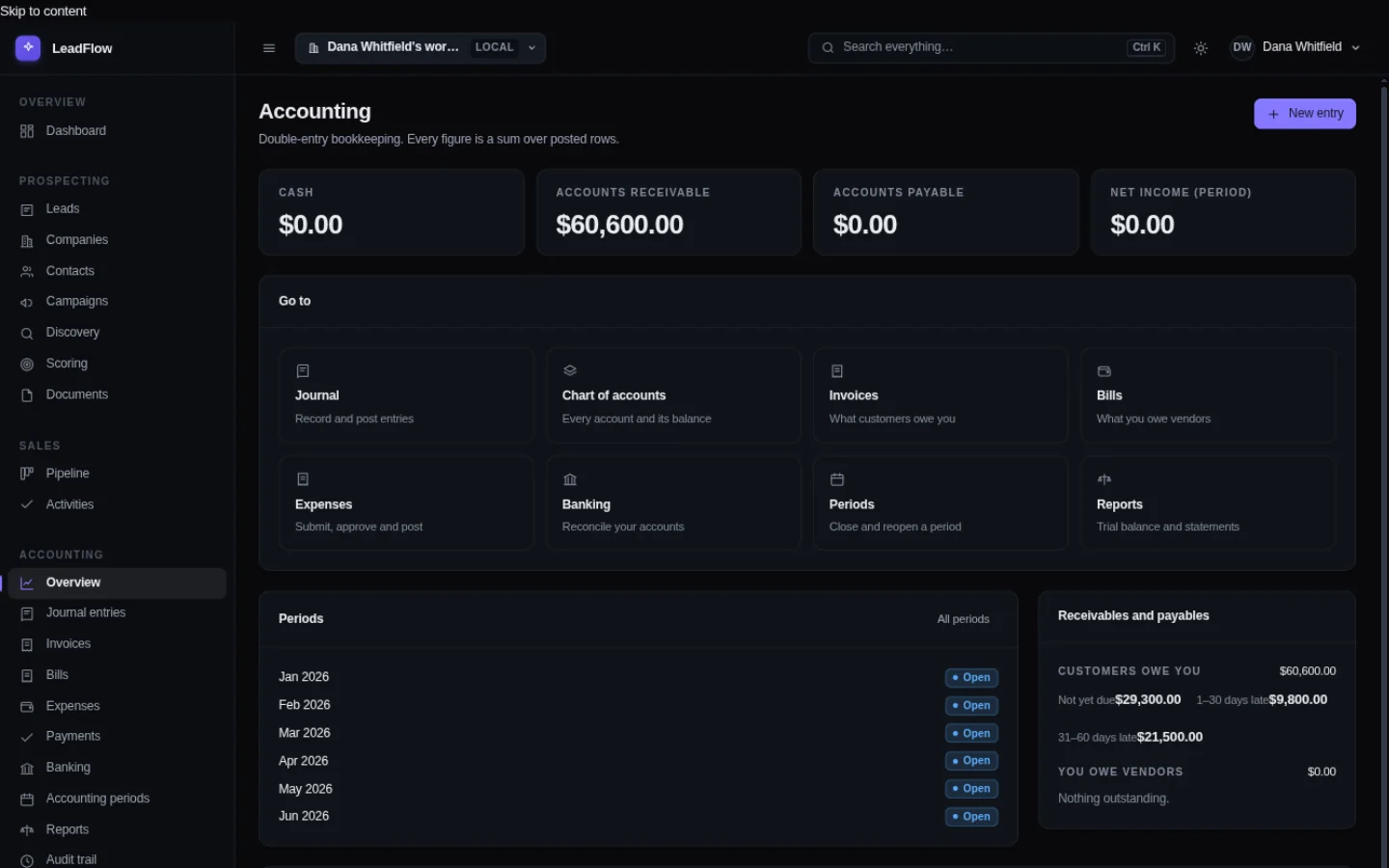
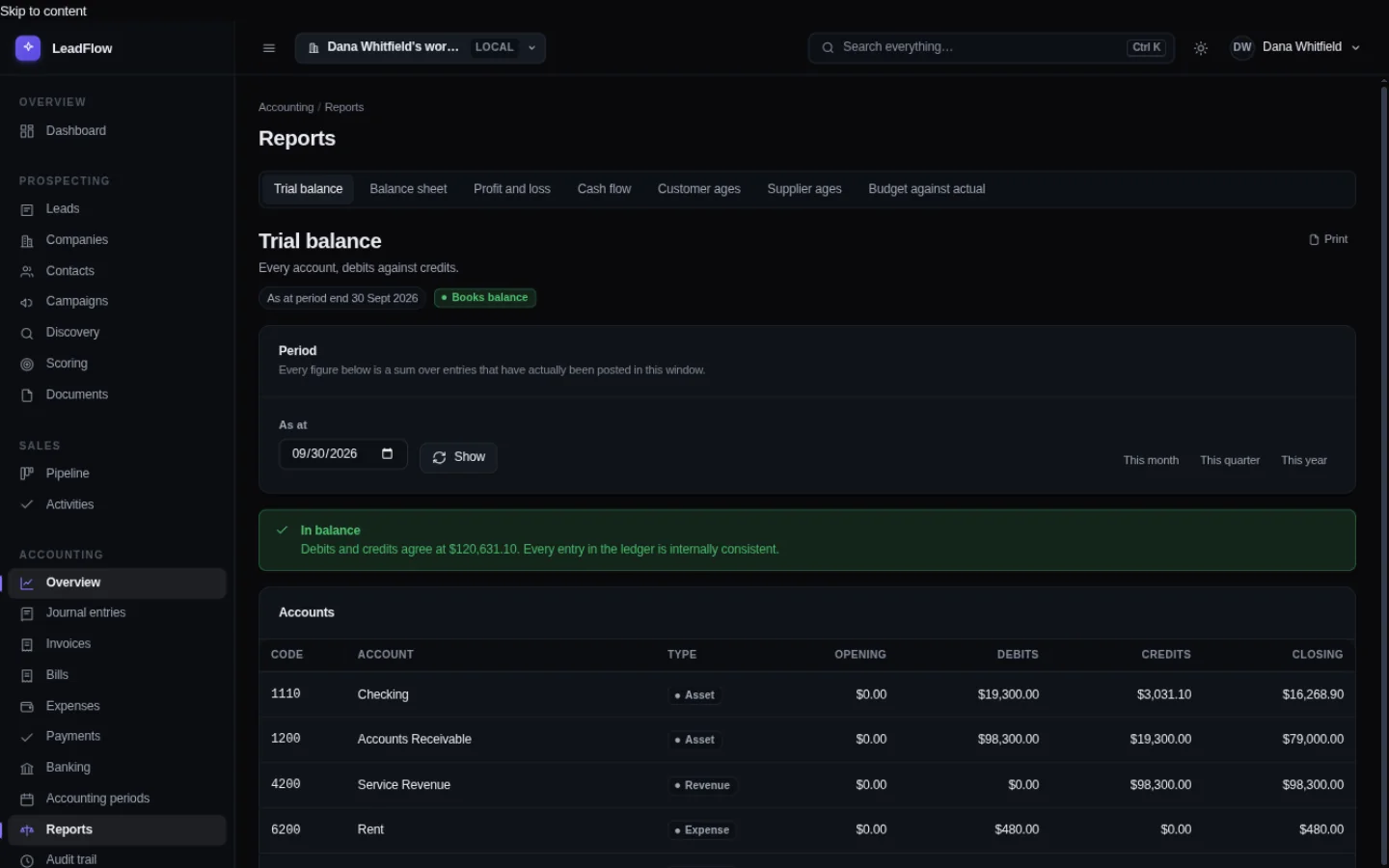
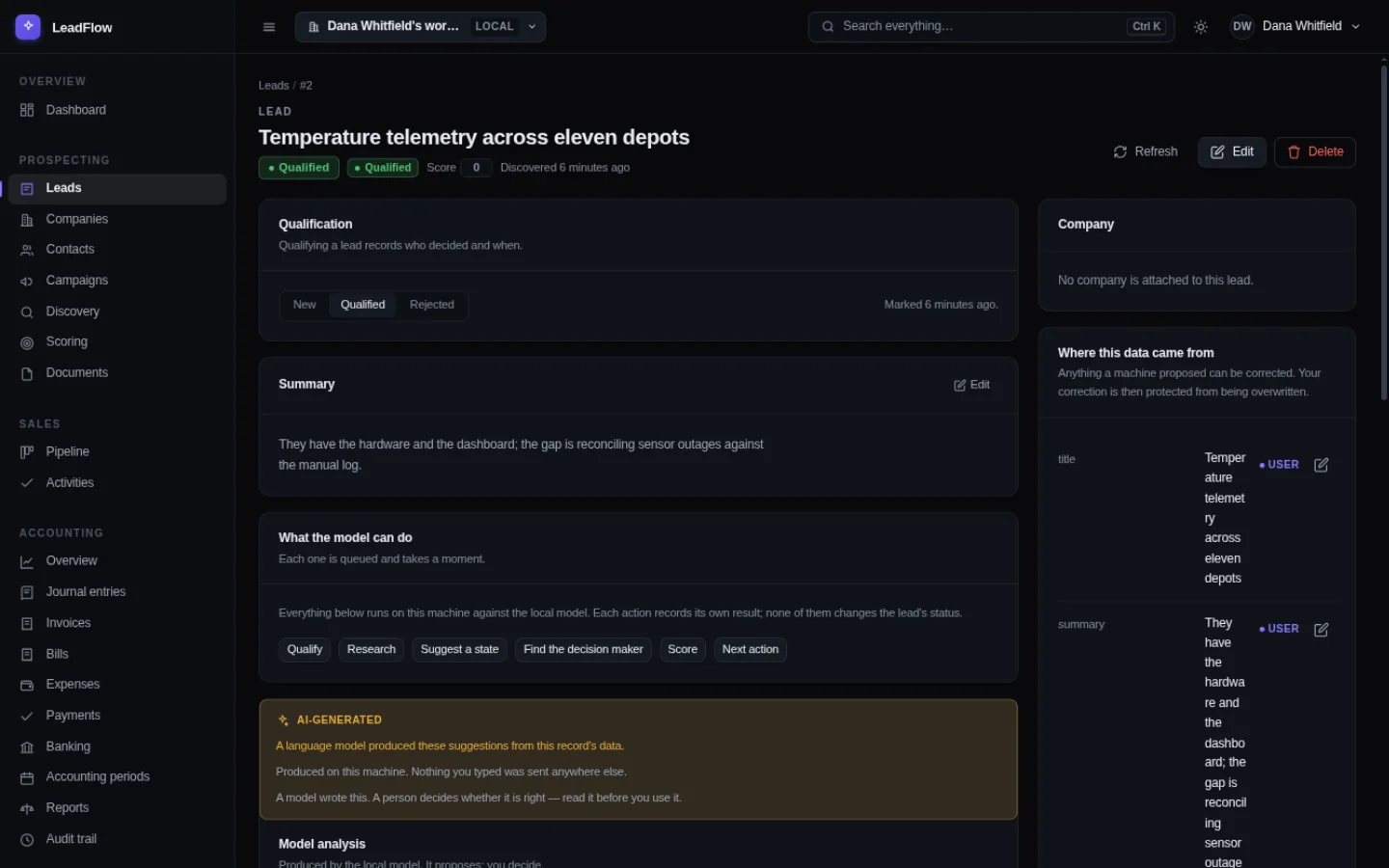
Nine more screens sit one click away in the sidebar: work orders, customer assets, items, inventory, production batches, e-commerce payouts, the journal composer, the forecast, and aged receivables. Four of them are above. The rest are here because a page of pictures stops being evidence and starts being decoration.
The records, up close
Four zoomed-in views of what the product actually writes. These are diagrams of the real record shapes — the same columns, the same account names — not screenshots. The photographs are above; this is the paperwork underneath them.
The entry an invoice posts
| 1200 | Accounts Receivable | Dr $1,240.00 |
| 4000 | Sales | Cr $1,240.00 |
| 2210 | Sales Tax Payable | Cr $103.33 |
One balanced entry, posted the moment the invoice is raised — not a week later by a bookkeeper re-typing it. The invoice and the entry are one record with a link between them.
Balanced to the cent or refused. Posted entries are immutable; a mistake is corrected with a reversal and a new entry.
A work order, priced
| Part — compressor clutch | 1 × $186.40 |
| Labor — recover & recharge | 2.5h × $95.00 |
| Material markup (15%) | $27.96 |
| Quote total | $351.86 |
Parts and labor on one sheet, each line carrying its own cost and markup. When the customer accepts, the quote becomes a work order; when the job closes, the work order becomes the invoice above.
Costs are integer cents in the database. A total that cannot be balanced is a bug that never ships.
An e-commerce payout, split
| Gross sales (TikTok Shop) | $8,204.19 |
| Platform & payment fees | −$492.25 |
| Shipping charged to buyer | −$311.40 |
| Affiliate commissions | −$164.08 |
| Refunds & returns | +$187.50 |
| Net deposited | $7,424.96 |
The payout from the platform is split into its components before it is booked, so revenue, fees, shipping and refunds land on the right accounts — and the entry balances against the bank line it came from.
Column mappings for Shopify, Etsy and Square ship alongside TikTok Shop. The split is a draft until a person posts it.
A batch build, costed
| Component — oak panel (12mm) | 6 × $41.20 |
| Component — hinge set | 12 × $3.85 |
| Component — finish, hardwax | 2 × $17.60 |
| Builds 6 units — cost each | $54.58 |
A bill of materials turns components into finished goods: the components leave raw materials, the build lands in finished goods at the cost of what went into it, and the movements are inventory transactions, not notes.
When a supplier raises a price, the margin watchdog flags the quotes that would now lose money.
The AI is the part worth explaining twice
Almost every piece of business software added “AI” in the last two years by connecting a small part of your business with somebody’s servers and billing you for it. That has a consequence people rarely discuss: the cost is not the feature, it is the standing arrangement with a company that now holds a copy of whatever you typed.
FoundrySuite runs its AI directly on your own hardware instead. It reads documents, drafts outreach, and summarizes leads — and every one of those is a draft for a person to approve. It does not post to the ledger or advance a pipeline stage on its own, and it is built to refuse overwriting a protected, human-entered value with an AI suggestion. Everything it produces waits for your decision.
Because the intelligence runs locally, there is no meter to read and nothing to pay per question. You provide the model file or point the software at a local endpoint you run, and it goes to work. The full list of what it may and may not do →
You can see it working, or not working
On every screen that runs the model there is a visible, code-tested disclosure saying what was generated, that you are responsible for it, and where the model ran.
Any value the software writes carries its exact origin — an AI inference, a system derivation, or a source it read — along with a confidence value. You can ask any record where a value came from and get an answer.
For a business whose customers are starting to ask those questions, pointing at a local system with a transparent paper trail is a much better answer than guessing what a cloud tool did.
What it is not
Every product page should have one of these. Ours is written by the people who built the thing, so treat it as unusually accurate.
It is not a hosted service
There is no version of this running somewhere with your name on it, and there will not be one. If you want a browser-only product managed by someone else, this is the wrong purchase and we would rather you find that out now.
It is not a chatbot
There are four AI features, and they do four jobs. You cannot have a conversation with it. That is a limitation we chose, because the value is in work being finished rather than questions being asked.
It is not a marketing automation platform
It drafts outreach and keeps the records. It does not send mail, manage your domain reputation or warm up an address. There is no send button, and that is a decision about who is responsible for mail.
It is not a replacement for an accountant
The ledger is real, double-entry, and balances to the cent. It is also only as correct as what goes into it. If you need statutory accounts, payroll or tax filing, this is a system of record to hand to your accountant — not a substitute for one.
Who this was built for
Software is usually designed for the largest buyer and sold downward. This was designed for the middle, and it shows. Four kinds of business prove it, and the objections differ for each: service & field businesses need the job card on a tablet in the van, makers & manufacturers need to know what a build actually cost, retailers & online sellers need to know what the marketplace payout really contained, and professional & advisory practices need every client record kept clean.
Who it is not for
- Anyone who needs staff in different countries working at the same time without a network you control.
- Large organizations whose actual requirement is multi-region resilience and a support contract with an SLA.
- Anyone who does not want to own the machine. There is no managed version. That is the product.
Questions people actually ask
Do I need to be technical?
If you can double-click a file, yes you can run this. The installer sets up a private environment inside the FoundrySuite folder and a launcher opens it afterwards. There is a command-line tool for people who want one, and nothing requires you to use it.
What happens on day 31?
The software stops starting and tells you the trial has ended. That is the whole mechanism — there is no remote switch and no feature that quietly degrades. Your data is untouched, and buying a license later reopens the same installation with all of it intact. The thirty-day trial, in full →
Is the AI as good as the big services?
No, and pretending otherwise would be easy to demonstrate and would cost you later. A small model on your own CPU is fast enough for summarizing a lead, drafting a paragraph and reading a document, and slow for a long reasoning task. If you want more, you can point it at a bigger model — locally or remotely — and it will tell you when it is doing that.
Does it do work orders and inventory?
Those are first-class, not modules bolted on: quotes become work orders, work orders become invoices, and items move through raw materials, work in progress and finished goods with every movement recorded. The sidebar changes with the kind of business you run — trades, maker, retail — so the screens you do not need are not in the way.
What if we are already in a cloud CRM?
Your export is a file, and this reads files. People move for any number of reasons and the least defensible one is “we could not get the data out”.
Will it work offline?
Everything except online research, yes. Lead the network cable out after you have the model and the CRM, ledger, document reading and AI features all keep working. Nothing on this site makes a third-party request either — that one you can check in the developer tools →
The one-sentence version, for the person who does the deciding
Still deciding?
Install it and put your own data in it. The thirty-day trial needs no card and no account, and you will know within an afternoon whether it fits your way of working. One workstation license is $2,200 once, $200 a month for twelve months, or $110 a month for twenty-four months — the software does not count seats.
If it does not, your whole business is one file you can copy onto a memory stick, and there is nothing to unpick.
Pitch This to the Boss (3-Year ROI Summary)
Replace $300+/mo of cloud CRM + accounting subscriptions with a single $2,200 license — outright, or $110 a month for twenty-four months — and save $8,100–$8,600+ across 3 years while keeping 100% of company financial data on-premise.
No per-seat fees. No renewal — $0/month forever after the last payment. Your data never leaves your building. See the three ways to pay →
An accountant, MSP, or trade association? Resell it—keep 50% above our $500 floor →
Put a month of real work through it
Thirty days, the whole product, no card. Nothing is sent to us, and nothing is deleted if you decide it is not for you.
Installing it is one installer and one launcher: no Python or package manager to set up, and nothing written to your system directories. How the install works →